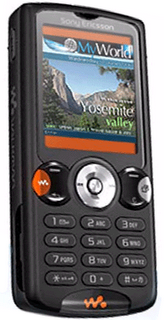
Chris Petty from Blue Sky North has submitted a Flash Lite 1.1 Tutorial for Sony Ericsson here for all interested in Flash Lite development. It's on the SE developer site. You can download the tutorial with code examples.
Showing posts with label Sony Ericsson. Show all posts
Showing posts with label Sony Ericsson. Show all posts
Monday, August 28, 2006
Flash Lite 1.1 Tutorial for Sony Ericsson

Tuesday, July 25, 2006
Sony M608c Phone
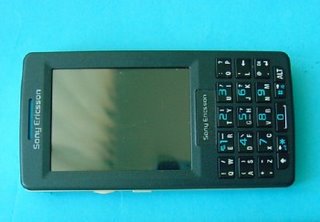
Documents available at the FCC show a recently approved Sony Ericsson M608c, a UIQ3 based all-in-one phone. The Sony M608c comes with a USB data cable and supports Memory Stick Micro (M2) for expanding memory. It features the familiar Jog Dial to scroll lists, doubling up as volume control when using it as an audio player.
A dual function keyboard is present on the phone, making it easier to enter text thanks to the QWERTY layout. A stylus takes care of recognizing your handwriting. The full-fledged web browser on the phone allows you to subscribe to RSS feeds as well.
The Sony M608c includes an advanced media player that handles playback of both audio and video files, and the phone is compatible with PlayNow service. In addition, both QuickOffice and PDF+ are pre-installed.
For now, the phone is set for the Chinese market - but it could hit other countries soon.
Friday, July 21, 2006
Phonojournalists Call The Shots On CurrentMobile and Earn some cash

Pick up your cell phone and start shooting—your video could make it on national TV! This summer Current TV, a U.S national cable and satellite channel dedicated to bringing the peoples voice to television (founded by former Vice-President Al Gore) has launched Current Mobile a new programming that showcases video from cell phones. As an innovative twist on Current's 'viewer created content,' or VC 2, Current Mobile will become a regular feature airing on Current. This makes Current (and its sponsor Sony Ericsson) the first network to regularly showcase mobile video content.
Current's viewer created content presently makes up over 30% of the network's broadcast, an Current's "viewer created ad messages" (or V-CAMs) allow viewers to create ads for the major brands that sponsor the network.
So, to jumpstart the program, Current TV will offer a summer promotion called MobileVision, sponsored by Sony Ericsson, where mobile videomakers can capture moments from summer festivals, hot street fashion, rants, and other topics that will be posted on Current's web site. The public can vote, or "greenlight," pieces on the website. Every Thursday at 5:00pm PST through August 31, a new winning video with the most greenlights will be selected, and the producer will receive $500 and be considered for television broadcast by Current TV's programming department. Any other upload that goes on air will earn $100 each.
Of course, in the nature of mobile video making “Current Mobile” pieces will be shorter, and capture moments rather than full stories. They will be easier to produce, requiring less editing and technical skills. For those without a videocamera, it can be the first way to start contributing video to the network.
Wednesday, July 12, 2006
Screen Capture for UIQ (Sony Ericsson P800/P900)
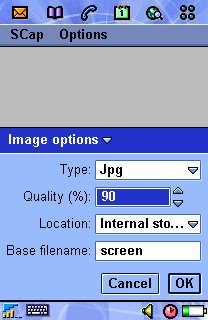
SCap for the SonyEricsson P800/P900 allows you to capture the full screen of a P800/P900 and save it to file. Start screen capture by selecting Start capture from the SCap menu, then use the hotkey to capture the screen. The images are stored in a folder called scap and you can use the P800/P900 Pictures application to view them. SCap can take screenshots in both Flip Open and Flip Closed.
Featurelist:
- File format: Save screenshots as 24-bits bmp, 8-bits bmp, gif or jpg. For jpg you can configure the image quality (and thus the file size).
- Location: You can configure screenshots to be stored on either the internal disk or the Memory Stick.
- Filename: You can specify the base file name of the screenshot image files. SCap will append a unique number to the base filename. For example, the default base file name is screen and the default image type is jpg, so images are called screen.jpg, screen-1.jpg etc.
- Hotkeys: Select Camera button, Browser button, Power button or Jog dial select as the hotkey.
- Auto/manual stop: You can configure SCap to either automatically stop the capturing after you've taken a screenshot (and thus release the hotkey to its normal use) or to leave it on until you manually select Stop capture from the SCap menu. This is handy if you want to take several screenshots.
- Visual feedback: If you enable visual feedback you get a small popup to say SCap is saving the image and a popup to say it is done. You can disable them which is usefull when taken screenshots of games such as EDoom or EMame as these popups will take these games out of their full screen mode.
- Audible feedback: You may select an audio file to be played after the screen capture is fully completed. Audible and visual feedback are usefull because for example saving a screenshot as gif on the memory stick may take 10 seconds. In that period you cannot take another screenshot.
Monday, July 10, 2006
New emulation features update Sony Ericsson SDK 2.2.4 for the Java ME Platform
The latest Sony Ericsson SDK 2.2.4 for the Java™ ME Platform introduces platformized emulation and platformized on-device debugging for Sony Ericsson's new Java Platform 7 (JP-7) mobile phones.
As a developer, rather than concentrating on the many different product names, only two variables need to be considered:
- Phone screen size
- Java Platform
This is realized by selecting the phone Java Platform as opposed to the product name, formatted as SonyEricsson_
Using this approach, JP-7 phones, which currently includes the K610, K800, K790, W850, Z710 and W710, can be tested and debugged using their appropriate screen configurations:
SonyEricsson_JP7_176x220
- K610
- W710
- Z710
SonyEricsson_JP7_240x320
- W850
- K790
- K800
As each new Sony Ericsson Java Platform is announced, the platform will be introduced to the Java ME SDK using the same naming approach.
In additional to platformization, the Java ME SDK 2.2.4 also introduces improved stability for on-device debugging in addition to updated Eclipse plug-ins and all interim phone announcements since the last SDK release.
Download Sony Ericsson SDK 2.2.4 for the Java ME Platform here>>
Monday, July 03, 2006
Cell Phone Hacks
 A comprehensive forum of Nokia. Sony Ericsson, Motorola, Siemens, Samsung, LG, Blackberry, etc. Phone Hacks, Service Provider Hacks, Security, Mod Chips, Discussion, Cellphone ring tones and hardware!
Saturday, July 01, 2006
Change the look of your Mobile Phone
If you are not into writing hundreds or thousands of lines of code and you are more artistic in a audio/visual kinda way you might want to check out some of the themes you can install on your Nokia or Sony Ericsson on the Opera Community website. You can also check out some of my themes I did in early 2004. Let me know what you think ...
If you want to create your own theme you can download the Series 60 Theme Studio if it didn't ship with your from the Forum Nokia web site. Have fun personalising your phone to be an individual like yourselves....
Subscribe to:
Posts (Atom)

 Posts
Posts


