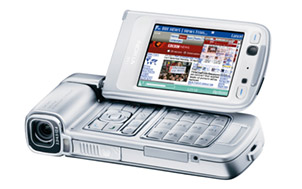
On a recent post at MEX you will find ways on how to minimise and sometimes depending on your location totally avoid data charges. If you have a mobile phone that supports WiFi this is a must read for you.
Showing posts with label tip. Show all posts
Showing posts with label tip. Show all posts
Wednesday, October 25, 2006
Ways to Avoid Using Your Operator

Tuesday, September 12, 2006
How to convert your Nokia into a spy Phone
Disclaimer
Before you read on, you must read this disclaimer:
I will not be held responsible for any damage you may inflict on your handset, nor any consequences which result from you implementing the techniques you read here.
Please be aware that in many countries, the use of covert surveillance devices is illegal. You must check the legality of your proposed actions before you implement them!!! Useful information on international privacy laws and covert surveillance can be found on this page and also on the BBC website.
Instruction
Nokia handsets (5510, 6110, 6210, 6310 are easier, though you can use 3210, 3310 and 3330, etc). For the purpose of clarity, I’ll assume you’re working with a 6210 or similar handset on which the “pins” are visible at the base of the phone close to where the charger plugs in. Other models, such as the 3310, can also be easily adapted as I will explain later in this guide.
Please note: This method does involve “hacking” the hardware of your handset!
At the base of your phone where the charger plugs in, you should see a row of ‘pins’ which look like the diagram below:
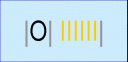
- The “O” is where the charger plugs in to the phone. The grey lines are the long silver pins and the yellow ones are the shorter copper pins.
- You need to short pins 3, 6 and 9 (highlighted in red in the diagram below).
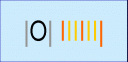
- This will cause the handset to “hang” after which the “headset” menu will become available.
- You should then alter the profile settings as in the first method so that “automatic answer” is enabled and the phone is on silent mode.
If you are still concerned that the screen will flash when a call is received, thus drawing attention to the handset, you may want to consider replacing the screen with one which is broken or doesn’t work. Alternatively, you could put a thin piece of paper between the contacts on the screen and the phone so that the screen does not operate, though I wouldn’t recommend this as it could cause permanent damage to the handset! At the moment, I do not know of any other method by which you can stop anything appearing on the screen when a call is received, though I will update this post if I find one!
Information and Legitimate Uses
Other handsets such as the 3310 and 8210 can also be adapted though this would involve dismantling the handset with the use of a torx mobile phone screwdriver in order to access the “charging port” near the base of the phone.
The pins which you need to short on these models are different to those mentioned above!
Instead, you would need to short only pins 4 and 5 which are just visible if you look inside the hole where the hands-free kit would plug in. Once you have access to the pins, it is relatively easy to do. The screwdrivers themselves are not expensive and can be purchased readily on Ebay for a few pounds.
As I have already stated, the use of covert surveillance devices is illegal in many countries. As far as I am aware, in the UK, it is not illegal to poses such a device, but it is illegal to use it to “spy” on another person without their express permission. Legitimate and lawful uses of the “spy phone” would be as a baby monitoring device, for example, or in experimenting with the transmission of sounds on your own property.
Monday, July 17, 2006
UrlEncoder for J2ME
A poor mans UrlEncoder for MIDP(J2ME) which can easily be extended by adding
more items to switch statement in the urlEncode method.
/*
* (C) Serkan Azmi. 2001
* All rights reserved
* The material(s) may be used and/or copied only with the written permission
* of Serkan Azmi. or in accordance with the terms and
* conditions stipulated in any agreement/contract under which
* the material(s) have been supplied.
*/
public class UrlParamEncoder {
String szUrlParam = null;
public UrlParamEncoder() {
}
private void prepAdd() {
if (szUrlParam == null) {
szUrlParam = new String();
}
else {
szUrlParam += "&";
}
}
public void addParam(String szName, String szValue) {
prepAdd();
szUrlParam += urlEncode(szName) + "=" + urlEncode(szValue);
}
public void addParam(String szName, int nValue) {
prepAdd();
szUrlParam += urlEncode(szName) + "=" + urlEncode(Integer.toString(nValue));
}
public void addParam(String szName, long lValue) {
prepAdd();
szUrlParam += urlEncode(szName) + "=" + urlEncode(Long.toString(lValue));
}
public void addParam(String szName, boolean bValue) {
prepAdd();
Boolean boolValue = new Boolean(bValue);
szUrlParam += urlEncode(szName) + "=" + urlEncode(boolValue.toString());
}
private String urlEncode(String s) {
StringBuffer sb = new StringBuffer();
for (int i = 0; i <>
switch (s.charAt(i)) {
case ' ':
sb.append("%20");
break;
case '+':
sb.append("%2b");
break;
case '\'':
sb.append("%27");
break;
case '<':
sb.append("%3c");
break;
case '>':
sb.append("%3e");
break;
case '#':
sb.append("%23");
break;
case '%':
sb.append("%25");
break;
case '{':
sb.append("%7b");
break;
case '}':
sb.append("%7d");
break;
case '\\':
sb.append("%5c");
break;
case '^':
sb.append("%5e");
break;
case '~':
sb.append("%73");
break;
case '[':
sb.append("%5b");
break;
case ']':
sb.append("%5d");
break;
default:
sb.append(s.charAt(i));
break;
}
}
return sb.toString();
}
public String toString() {
return szUrlParam;
}
}
Wednesday, July 12, 2006
Free J2ME emulator that runs in a webpage

Do you program Java ME (formerly J2ME)? If so, you might like to know about a free J2ME emulator that you can embed into your web pages.
To use mPowerPlayer start with the URL…
http://webstart.mpowerplayer.com/
All you need to do is append your URL and .jnlpto and that’s it!
For example,
http://ota.mpowers.net/piranha/pna-us.jadbecomes
http://webstart.mpowerplayer.com/ota.mpowers.net/piranha/pna-us.jad.jnlp
Sunday, July 09, 2006
Getting the IMEI code from Series 40 3rd Edition devices
I searched in internet something about problem with application which I code now, and found interesting trick on Nokia forum . You can get the IMEI code from Series 40 3rd Edition devices in your midlet
All you need - to retrieve the system property “com.nokia.mid.imei“. This works in some of the latest Series 40 3rd Edition devices. Of course, your MIDlet should be signed before using such system property, without it you can test this on emulator
Subscribe to:
Posts (Atom)

 Posts
Posts


