Showing posts with label Symbian. Show all posts

Wednesday, November 01, 2006

New Torrent Applications for S60 3rd Edition Now Available

Symella and SymTorrent are now available for S60 3rd edition. Both apps have been tested on Nokia N80 and N91 multimedia computers.

Symella is a Gnutella client for Symbian smartphones. Gnutella is a popular Peer-to-Peer file sharing network with several users from all around the world.

SymTorrent is a BitTorrent client for Symbian smartphones. BitTorrent is a very popular peer-to-peer file-sharing protocol used by millions of users worldwide. SymTorrent is the first full-featured and complete BitTorrent client for Symbian OS. It supports downloading multiple torrent files at the same time, is capable of both downloading and uploading and can save the status of your unfinished torrents, so you can resume the downloads after restarting the application. You can also check the status of each file inside a torrent along with several other statistics and properties during download.

Thursday, October 26, 2006

Peer to Peer on your Mobile


Peer Box is a free mobile peer-to-peer file sharing service for the mobile devices.
PeerBox enables mobile phone users to search and download millions of songs, ringtones, videos, pictures and games. Peer Box runs on most Symbian OS S60 smart phones .

Monday, October 16, 2006

How to Recover a password from a MMC card on your Mobile


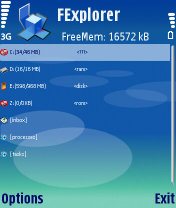
1 Open any file manager softwares like Seleq, FExplorer.
DOWNLOAD SELEQ FROM THIS POST

2 (Search phone memory only)search for the file MMCSTORE in phonememory using seleq software’s inbuilt search or search manually in folders either C:/SYSTEM/DATA or C:/SYSTEM/
Search by giving the search item as mmcstore.* or mmcstore.dat (better manually locate)(Seleq represents phone memory as c drive and mmc as E drive)

3 when you find it, send it to your PC by using send option in seleq.

4 on PC, open the file with Notepad, or any word processor

5 There goes your password.Ignore spaces and any unidentificable unknown (non english) charecters.

You can only recover the password of the MMC card set on your phone. If the password for the card was set on another phone you would have to apply the above procedure on the phone which originally set the MMC password. That is to say you can't insert the MMC card into another phone and search the phonememory for the password there.

Saturday, October 14, 2006

Python for S60 1.3.11 released

New Features of Python S60 1.3.11 include

  • Full source-code release and open source licensing
  • Inbox module for listening to and parsing incoming SMS messages
  • Expanded audio API
  • Focus-event notification
  • New Active Object timer service
  • Support for SVG images (S60 3rd Edition only)

S60 3rd Edition FP1 - Symbian OS 9.2 SDK now Available


The N95 SDK is out get your hands on it now. The FP1 contains the S60 device emulator, API implementations, documentation, and sample applications as previous SDK's.

Monday, October 09, 2006

Symbian On Frappr

Friday, September 29, 2006

New S60 and UIQ Application Site


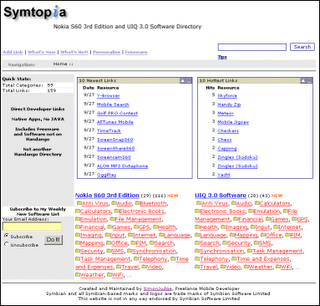
Symtopia.com is a new site that from Simon Judge which lists S60 3rd Edition and UIQ 3.0 (Symbian 9.1) applications. All applications are native C++ with no Java listings.
If you are a developer you can have your application listed on the website with an easy one click Add Link button located on the site.
There are a whole lot of freeware applications all searchable by category.

In Simon's words these are the main reasons he put up Symtopia:

Here are my general impressions having visited the various developer web sites, forums and existing (mainly Handango-based) directories…

The 80/20 principle seems to apply. There are a few developers producing large numbers of titles. Prior to Symbian 9.1 there were many more developers each producing fewer titles. Maybe the developers producing the large number of titles were those who previously made a good profit pre- Symbian 9.1.

There is approximately three times as many S60 applications as UIQ applications. This might be explained by the fact that UIQ 3.0 devices and SDKs trailed S60 by about a month. However, I still can’t envisage the number of UIQ 3.0 reaching the same as S60 (now) in a months time.

There’s evidence of developers stalling during development (e.g. FExplorer, Papyrus, Blackballer) due to complexities of platform security.

There are some instances of end-users automatically assuming older (pre-Symbian 9.1) software will run on Symbian 9.1 devices leading to consumer frustration.

Thursday, September 28, 2006

Powerful Symbian SIS file Packer / Unpacker

YAMGui Plus Is a very usefull handy piece of software for all symbian power users, this great software allows you to make sis files, un make sis files, preview themes and much more. Currently YamGUI Plus does not support 3rd edition sis files, this might be implemented in the future releases of YAMGui.

Main features:

  • Create SIS Files
  • create sis files
  • grab UID from .sis and .app
  • grab app name and version info from .sis
  • add popup from textfile or type new one
  • set type of popup
  • choose position of popup (begin/end)
  • preview popup
  • embed sis in sis
  • set default directories to easy the browsing
  • save as .pkg file to process later
  • process .pkg file
  • Unpack/Rebuild SIS rebuild sis files, good for themes when you get Series60SkinSupport error
    files are rebuilt with same name, UID and target platform Series 60 v0.9 (all)

SIS Info/Extract features:

  • view all info from sis file
  • view appname for all languages
  • view all languages
  • view behavior of sis files with If, Else and Options
  • extract all files
  • choice to extract all languages or only one
  • save the listing in txt file

Preview theme:

  • preview a theme is sis format
  • ability to show icons
  • ability to save preview images
New features:
  • added option to Unpack/Rebuild SIS files this is a very usefull option for those amongst us that are experiencing problems when installing themes (series60skinsupport messages)
  • currently it will only show the Idle screen background of some themes
  • expanded the theme preview feature, it will now show Idle screen
  • Calendar background
  • Menu background
  • Favorites background
  • Menupopup
  • added the ability to show Signal and Battery level
  • added the ability to show Icons if any exists
  • added the ability to save the preview images
  • you will be asked for a save path, the names will be like they are show preceding by the theme name ex.: Hitman_Calendar.bmp
  • fixed a bug that caused runtime error 53
  • created a proper installer

Tuesday, September 26, 2006

DivX Player for your Mobile Phone


This great little application runs plays divx video files on your mobile phone.
It runs on:
Symbian Devices (for Symbian version 6.0 and greater)
* Series 60: Nokia 3230, 3650, 6260, 6600, 6630, 6670, 6680, 7610, N-gage, N70, N90

Siemens SX1, Panasonic X700, X800

* S60 3rd edition: Nokia E60, E61, E70, N71, N80, N91, N92, 5500

* UIQ: Sony Ericsson P800, P900, P910, Motorola A920, A925, A1000, BenQ P30
Microsoft Devices (for Windows Mobile 2002 and greater)

* Windows Mobile SmartPhone: 2002/2003

* Microsoft Mobile Pocket PC: 2002/2003, Windows Mobile 5

For downloading to a PC and installing using ActiveSynch, use the following link:

* Windows Mobile Smartphone, PC installer

* Windows Mobile Pocket PC, PC installer

Palm Devices (version 5.0 or greater)

Download to PC first, unzip the file and load both files to the PalmOS device.

* Palm OS: Treo 600, 650, Tungsten C, E, T3, T5, Zire 72, Samsung SGH-i530, Sony Clie, Tapwave Zodiac

There is also a sister application which allows you to subscribe to RSS feeds which publish new content named Discovery DivX Mobile (DDM).
DISCOVER DIVX MOBILE DOWNLOADS:

Symbian Devices

* Symbian Devices DDM (Nokia Series 60 and UIQ)

Microsoft Devices (for Windows Mobile 2002 and greater)

A Java Virtual Machine is requuired

* Windows Mobile SmartPhone DDM

* Windows Mobile Pocket PC DDM

Palm Devices (version 5.0 or greater)

A Java Virtual Machine is required

* Palm OS DDM

You can check out some movie trailers and music videos on their site.


Thursday, September 21, 2006

Mobile Phones used for Outdoor Games


Mobile games are the new way of getting people off the couch, out of the house and out for some fun these days. With technologies like bluetooth, GPS, GRPS, 3G, 4G, cameraphones, smartphones, Symbian, Flash Lite, etc., becoming the norm , game developers are coming up with great game ideas and implementing them.
With GPS and mobile phones paired together street games has become a reality. Check out "Come Out & Play Festival" which will take place in New York City from September 22nd to 24th for a list of mobile games that are available.
The details for the mobile games are Insider, snagu, Crossroads, Spy Text, Sleuth!, The Go Game, Conquer The Quarter, Manhattan Story Mashup.

Wednesday, September 20, 2006

Flash Lite takes on Java and C++


Flash Lite adoption is growing at a very rapid rate. It is most probably because it is so easy to code for and there are so many Flash designers/developers out there today that have now found a new media outlet - mobile phone users.
So watch out Symbian (C++) and Java Micro Edition (JavaME,J2ME) you have a new contender in the arena.

Monday, September 18, 2006

Pre-Release Version of Core Player Being Distributed


Core Code project has announced that they are inviting individuals to participate in a pre-release of the CorePlayer project.

It is a cross platform player which runs on CE, Windows Mobile, Pocket PC, Palm, Symbian, Windows, Vista, UMPC, OS X, and Linux.

Features Include:
- Advanced Skins
- Streaming (http/udp/mms/rtp/rtsp)
- Visualizations 2D and 3D
- Video: H.264, DivX, MKV, MOV, WMV, MPEG-1, MPEG-2, OGM, 3GP
- Audio: AAC, MP3, WMA, MID, AC-3, MKA, OGG, FLAC, AMR, WAV
- CorePlayer PMP Mobile
- 'Seek and Share' Social Network Sharing Technology
- CoreTunes Desktop Media Library
- CorePlayerX Web Browser Plug-in
- CoreSync Mobile, Server. Desktop Media Synchronization
- CoreTheque Media Library Database

Saturday, September 16, 2006

Symbian S60 (Series 60) Web browser v2.0


The new features include:

  • Support for FlashLite 2.0
  • Support for SVG-T
  • RSS-reader improved
  • Save pages for offline viewing
  • Merged Services with Web Browser
  • Save usernames & passwords for websites
For further info and screen shots visit Phone Scoop.

Friday, September 08, 2006

Running EXE file on the S60 2nd Edition


Use this code for the 2nd edition. Note that the first half of the if statement is just so that the code works on the emulator. This is because the emulator uses a Dynamic Link Library (DLL), therefore we need to employ library functions. However the overall outcome is the same.


TRequestStatus start;
TServerStart starter(start);

#ifdef __WINS__ // On the Windows emulator the process is a DLL
RLibrary lib;
lib.Load(KBinaryName, BinaryUid);
TLibraryFunction export1 = lib.Lookup(1);
TThreadFunction threadFunction = reinterpret_cast (export1());
TName name(KBinaryName);
// Randomness ensures a unique thread name
name.AppendNum(Math::Random(), EHex);

// Now create the server thread
const TInt KMinHeapSize=0x1000;
const TInt KMaxHeapSize=0x1000000;
RThread thread;
thread.Create(name, threadFunction, KDefaultStackSize,
&starter, &lib, NULL,KMinHeapSize, KMaxHeapSize, EOwnerProcess);
lib.Close();
#else // Phone hardware
RProcess process;
process.Create(KBinaryName,starter.AsCommand(), BinaryUid);
#endif

Running EXE file on S60 3rd Edition

This code only works on S60 3rd Edition.
You can use it to invoke an executable from with your application. Make sure you cleanup after yourself and don't leave any rouge applications running in the background.


RProcess server;
server.Create(KServerName, KNullDesC);

CApaCommandLine* commandLine = CApaCommandLine::NewL();
commandLine->SetExecutableNameL(KExecutableName);
commandLine->SetProcessEnvironmentL(server);

RApaLsSession ApaSession;
ApaSession.Connect();
ApaSession.StartApp(*commandLine);
ApaSession.Close();

delete commandLine;

Free Symbian OS booklets


If you are planning on or just new at Symbian development there are 3 essential OS booklets named 'Getting Started', 'Signing Tips' and 'Coding Tips' available for free download or email Symbian editor@symbian.com for a paper copy version.
There is also a Chinese version of the 'Getting Started' booklet available.

Monday, August 28, 2006

SIS Info tool for Symbian 9.1 SIS files

A new python utility to get information from a Symbian 3rd edition SIS file accoding to the new format (.sisx).

Saturday, August 19, 2006

Getting the Current Cell Id using Symbian S60

What you need:
Series 60 SDK
Communicator 9200 SDK version 0.9 or higher
etel.h from Communicator 9200 SDK
etelbgsm.h from Communicator 9200 SDK

Instructions:
Copy etel.h and etelbgsm.h to the \Symbian\6.1\Series60\Epoc32\Include directory.

Link your app to gsmbas.lib and etel.lib.

Use this code:

 RBasicGsmPhone phone;
RTelServer server;

User::LeaveIfError( server.Connect() );
// load a phone profile
_LIT(KGsmModuleName, "phonetsy.tsy");
User::LeaveIfError( server.LoadPhoneModule( KGsmModuleName ) );

// initialize the phone object
RTelServer::TPhoneInfo info;
User::LeaveIfError( server.GetPhoneInfo( 0, info ) );
User::LeaveIfError( phone.Open( server, info.iName ) );

MBasicGsmPhoneNetwork::TCurrentNetworkInfo netinfo;
User::LeaveIfError( phone.GetCurrentNetworkInfo( netinfo ) );

Now you should be able to access the fields of
MBasicGsmPhoneNetwork::TCurrentNetworkInfo
which are
.iCellId
.iLocationAreaCode
.iNetworkInfo.iShortName

Once you have grabbed the info use this code to clean up:

phone.Close();
server.UnloadPhoneModule( KGsmModuleName );

server.Close();

All the code should work for the 6600 as well. You have the option of
just compiling with the 1.2 SDK or copying the headers to the 2.0 SDK .

Explore the other functions and data available through these objects as well. The headers should provide you with enough information to figure out what they are. Not all of them are completely implemented. According to a Forum Nokia post you can get to the information by:

  • ManufacturerId, Serial No: GetPhoneInfo()
  • BER, battery status: GetX - async version
  • Signal Strength: SignalStrengthNotification()

Use the NotifyChangeOfCurrentNetwork, so that works as well.


Sunday, August 13, 2006

Mission Statement


The time is now! Mobile technology is to sky rocket with the consumer base forever upgrading their mobile phones. Java-enabled phones together with Symbian OS phones make life and business much easier. Download the Midlet Development Kit and Symbian SDK and get started. Unleash your website to the wireless network. Deliver real time content to your clients via mobile.

Saturday, August 05, 2006

Open source telnet/SSH client


Just in case you didn't know already you can get it from
http://s2putty.sourceforge.net/ .
Open source telnet/SSH client for your Symbian Series 60 (S60) phone.