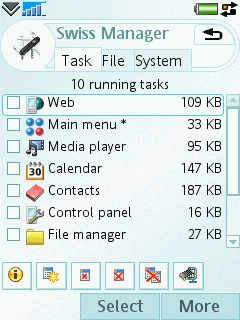
Symbian OS software developers cellphonesoft has just released Swiss Manager, a composite system utility for UIQ3. It provides task manager, file manager and system information services, giving you more access to and more knowledge about your phone.
Swiss Manager is an essential addition to your UIQ3 device which features:
* Management of running programs (task information, task switch, task exit)
* Release memory by exiting all running programs at once, optionally when closing the flip
* Navigation throughout the phone's drives and their entire file system
* File management (copy, move, delete, rename)
* Displaying the amount of free memory and disk space
* Useful system information (device characteristics, system uptime, battery level, IMEI number, etc.)
Sunday, September 10, 2006
Free system utility for Symbian UIQ3

Thursday, July 27, 2006
Signing Error Messages Series 60 (S60) 3rd Edition
If you have been reading discussions at Forum Nokia Developer Discussion Board recently, you may notice there are many questions about signing in S60 3rd Edition. It seems the new security feature in Symbian 9 has led to frustration for some developers.
I would like to share what kind of error messages I have seen when installing signed/unsigned application in S60 3rd Edition phones. There is a hint that explains what may cause a particular message. I may not be able to cover all error messages because I may not have seen all of them.
Read also a nice blog posting from S60 team, Signing applications for S60 3rd Edition.
Message: Certificate error. Contact the application supplier.
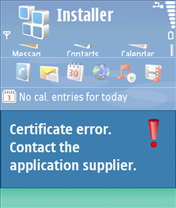
Hint: You may have tried installing unsigned application. Note that signing is mandatory S60 3rd Edition. You can use self-signed certificate or developer certificate from Symbian Signed to sign your application.
Message: Unable to install. Constrained by the certificate.
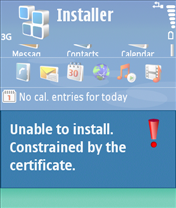
Hint: This message pops up when you attempt to install developer certificate in the unsupported device. The developer certificate from Symbian Signed can only be used in a limited number of devices. Remember that you have to send your IMEIs to Symbian Signed when requesting certificate. You cannot use the certificate in other devices that is not in your IMEIs list.
Message: Required application access not granted
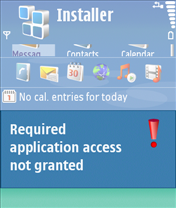
Hint: Check that your certificate can be used to sign all capabilities needed by your application. For example, if you use self-signed certificate, you can only sign basic set capabilities, i.e. NetworkServices, ReadUserData, WriteUserData, LocalServices and UserEnvironment. If your application requires one of the extended capabilities, for example SwEvent, you cannot sign it with self-signed certificate. In this case, apply for developer certificates from Symbian Signed.
Message: Unable to install a protected application from an untrusted supplier
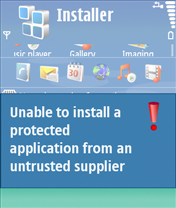
Hint: If you use self-signed certificate, make sure that your application uses unprotected UID, i.e. 0xA0000000 - 0xAFFFFFFF. If you use protected UID (0×20000000 - 0×2FFFFFFF) or legacy UID (0×10000000 - 0×1FFFFFFF), you will get this message.
Message: Unable to install
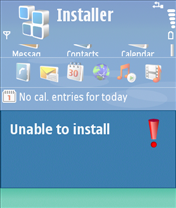
Hint: This message may come up when your installation file (.sis/.sisx) copies files to other application’s private folder, i.e. \private\uid. Note that Symbian 9 introduces data caging concept, it means you don’t have access to other application’s private folder.
Sunday, July 09, 2006
Getting the IMEI code from Series 40 3rd Edition devices
I searched in internet something about problem with application which I code now, and found interesting trick on Nokia forum . You can get the IMEI code from Series 40 3rd Edition devices in your midlet
All you need - to retrieve the system property “com.nokia.mid.imei“. This works in some of the latest Series 40 3rd Edition devices. Of course, your MIDlet should be signed before using such system property, without it you can test this on emulator
Saturday, July 08, 2006
Nokia 3310 Secret codes
*#06# To find IMEI
*#7780# Restores Factory Settings..(Memory, language, counters not included)
*#3110# For checking the software (SW) - called firmware revision information.
*#746025625# [*#sim0clock#] To check if the Sim-Clock can be Stopped (Sim-clock-stop is a kind of standby mode which will save battery time)
*#92702689# [*#war0anty#] Phone asks 'warranty code:'
6232 (OK) Displays the Month and Year of Manufacture
9268 (OK) Displays Serial Number
7332 (OK) Displays the date of the last repairment - if found
7832 (OK) Displays (if found) the date where the phone was purchased
37832 (OK) Set the Purchasing Date MMYY (This date can be set only once!)
87267 (OK) Transfers ALL phone numbers, Logo's, and ringtones from other gsm phones
Monday, July 03, 2006
Nokia Mobile Phone Hidden Features
These codes will work on most Nokia Mobile Phones to activate/deactivate advanced hidden functions that you can’t change through the phone menu
Code Function
*3370# Activate Enhanced Full Rate Codec (EFR) - Your phone uses the best sound quality but talk time is reduced my approx. 5%
#3370# Deactivate Enhanced Full Rate Codec (EFR)
*#4720# Activate Half Rate Codec - Your phone uses a lower quality sound but you should gain approx 30% more Talk Time
*#4720# Deactivate Half Rate Codec
#pw+1234567890+1# Provider Lock Status. (use the “*” button to obtain the “p,w” and “+” symbols)
#pw+1234567890+2# Network Lock Status. (use the “*” button to obtain the “p,w” and “+” symbols)
#pw+1234567890+3# Country Lock Status. (use the “*” button to obtain the “p,w” and “+” symbols)
#pw+1234567890+4# SIM Card Lock Status. (use the “*” button to obtain the “p,w” and “+” symbols)
12345 This is the default security code
*#21# Allows you to check the number that “All Calls” are diverted to
*#30# Lets you see the private number
*#43# Allows you to check the “Call Waiting” status of your phone.
*#61# Allows you to check the number that “On No Reply” calls are diverted to
*#62# Allows you to check the number that “Divert If Unreachable (no service)” calls are diverted to
*#67# Allows you to check the number that “On Busy Calls” are diverted to
*#0000# Displays your phones software version, 1st Line : Software Version, 2nd Line : Software Release Date, 3rd Line : Compression Type
*#9999# Phones software version if *#0000# does not work
*#06# For checking the International Mobile Equipment Identity (IMEI Number)
*#67705646# Removes operator logo on 3310 & 3330
*#73# Reset phone timers and game scores
*#746025625# Displays the SIM Clock status, if your phone supports this power saving feature “SIM Clock Stop Allowed", it means you will get the best standby time possible
*#94870345123456789# Deactivate the PWM-Mem
press and hold # Lets you switch between lines
*#7760# Manufacturers code
*#7780# Restore factory settings
*#8110# Software version for the nokia 8110
*#92702689# Displays - 1.Serial Number, 2.Date Made, 3.Purchase Date, 4.Date of last repair (0000 for no repairs), 5.Transfer User Data. To exit this mode you need to switch your phone off then on again
**21*number# Turn on “All Calls” diverting to the phone number entered
**61*number# Turn on “No Reply” diverting to the phone number entered
**67*number# Turn on “On Busy” diverting to the phone number entered

 Posts
Posts


