A poor mans UrlEncoder for MIDP(J2ME) which can easily be extended by adding
more items to switch statement in the urlEncode method.
/*
* (C) Serkan Azmi. 2001
* All rights reserved
* The material(s) may be used and/or copied only with the written permission
* of Serkan Azmi. or in accordance with the terms and
* conditions stipulated in any agreement/contract under which
* the material(s) have been supplied.
*/
public class UrlParamEncoder {
String szUrlParam = null;
public UrlParamEncoder() {
}
private void prepAdd() {
if (szUrlParam == null) {
szUrlParam = new String();
}
else {
szUrlParam += "&";
}
}
public void addParam(String szName, String szValue) {
prepAdd();
szUrlParam += urlEncode(szName) + "=" + urlEncode(szValue);
}
public void addParam(String szName, int nValue) {
prepAdd();
szUrlParam += urlEncode(szName) + "=" + urlEncode(Integer.toString(nValue));
}
public void addParam(String szName, long lValue) {
prepAdd();
szUrlParam += urlEncode(szName) + "=" + urlEncode(Long.toString(lValue));
}
public void addParam(String szName, boolean bValue) {
prepAdd();
Boolean boolValue = new Boolean(bValue);
szUrlParam += urlEncode(szName) + "=" + urlEncode(boolValue.toString());
}
private String urlEncode(String s) {
StringBuffer sb = new StringBuffer();
for (int i = 0; i <>
switch (s.charAt(i)) {
case ' ':
sb.append("%20");
break;
case '+':
sb.append("%2b");
break;
case '\'':
sb.append("%27");
break;
case '<':
sb.append("%3c");
break;
case '>':
sb.append("%3e");
break;
case '#':
sb.append("%23");
break;
case '%':
sb.append("%25");
break;
case '{':
sb.append("%7b");
break;
case '}':
sb.append("%7d");
break;
case '\\':
sb.append("%5c");
break;
case '^':
sb.append("%5e");
break;
case '~':
sb.append("%73");
break;
case '[':
sb.append("%5b");
break;
case ']':
sb.append("%5d");
break;
default:
sb.append(s.charAt(i));
break;
}
}
return sb.toString();
}
public String toString() {
return szUrlParam;
}
}
Monday, July 17, 2006
UrlEncoder for J2ME

Wednesday, July 12, 2006
MIDlet About Command Button Example
Here is some code I wrote back in 2002 which will display a copyright character \251 , specified image located in the resoures, checkes for device capabilitities ie. if it is able to render in color or black and white.
You can modify the About class to have parameters for the copyright string and icon variables.
public class X extends javax.microedition.midlet.MIDlet implements CommandListener, Runnable {
...
/** command about */
private Command cmdAbout = null;
...
...
cmdAbout = new Command("About", Command.HELP, 30);
anyForm.addCommand(cmdAbout);
...
public void commandAction(Command cmd, Displayable d) {
...
if (cmd == cmdAbout) {
About.showAbout(display);
}
....
/*
* @(#)About.java
* (C) Copyright Serkan Azmi. 2001
* All rights reserved
* The material(s) may be used and/or copied only with the written permission
* of Serkan Azmi. or in accordance with the terms and
* conditions stipulated in any agreement/contract under which
* the material(s) have been supplied.
*
* Created on 18 September 2001, 08:44
*/
import javax.microedition.lcdui.*;
/**
* Typical about box with a string and an image.
*/
public class About {
private static String copyright =
"\251 Serkan Azmi 2002";
private Displayable previous; // the previous screen to go back to
private About() {}; // no instances
/**
* Put up the About box and when the use click ok return
* to the previous screen.
*/
public static void showAbout(Display display) {
Alert alert = new Alert("About");
alert.setTimeout(Alert.FOREVER);
if (display.numColors() > 2) {
String icon = (display.isColor()) ?
"/icons/NAME_OF_APPLICATION_ICON.png" : "/icons/NAME_OF_APPLICATION_ICON_IN_GREYSCALE.png";
try {
Image image = Image.createImage(icon);
alert.setImage(image);
} catch (java.io.IOException x) {
// just don't append the image.
}
}
Runtime runtime = Runtime.getRuntime();
runtime.gc();
alert.setString(copyright);
display.setCurrent(alert);
}
}
Telnet from your mobile phone
µTelnet is a Telnet client for J2ME/MIDP mobile devices? featuring:
- direct TCP connection to remote sites
- an ANSI-compatible terminal with offscreen scrolling
- an interface adapted to limited input capabilities
- bookmark management, command history and control characters support
µTelnet requires a J2ME/MIDP-compatible device that has support for socket connections.
- PalmOS devices (with MIDP for PalmOS installed)
Also, note that for proper text formatting, your device would need to have access to a monospace font (like the one used on this page).
Disclaimer: before using µTelnet, you should be aware that the Telnet protocol is inherently insecure, everything you type including your password is sent as clear text in the air so use it at your own risks !
Tuesday, July 11, 2006
VNC Viewer on your mobile
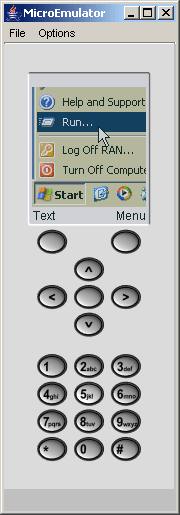
VNC2Go is a VNC client (viewer) that runs on MIDP-enabled devices. It lets you control any desktop server running a VNC service, from any mobile device that supports Java Midlets, such as mobile phones and PDAs.
Needless to say, a mobile phone is not the friendliest interface to remote control a desktop computer. However, when you need it, you need it. You can use VNC2Go to send yourself a document you forgot at home, restart a service that crashed, check for an expected mail message, look up a phone number you have at home, etc.
Hopefully, within a couple of years the mobile phone interface will be more mature for such advanced applications, with bigger and better resolution screens and simpler input mechanisms. VNC2Go has several input modes, to try and compensate for the not-so-friendly phone interfaces.
VNC2Go 1.1 (MIDP 1.0 Midlet) (21K)
VNC2Go 1.1 (JAD installation file) (1K)
Monday, July 10, 2006
MIDlet Splash Screen Example
package display;
import java.io.IOException;
import javax.microedition.lcdui.*;
/**
* A simple splash screen.
*
*/
public class SplashScreen
extends Canvas
implements Runnable {
private Image mImage;
private Display mDisplay;
private Displayable mNextDisplayable;
/**
* Create a newSplashScreen. The constructor
* attempts to load the named image and begins a timeout
* thread. The splash screen can be dismissed with a key
* press, a pointer press, or a timeout (hardcoded at
* three seconds).
*
* @param name the path of the image resource to load
* @param display the application'sDisplay
* @param next the screen to be shown after the splash
*/
public SplashScreen(String name,
Display display, Displayable next) throws IOException {
mImage = Image.createImage(name);
mDisplay = display;
mNextDisplayable = next;
Thread t = new Thread(this);
t.start();
}
/**
* Paints the image centered on the screen.
*/
public void paint(Graphics g) {
int width = getWidth();
int height = getHeight();
g.drawImage(mImage, width / 2, height / 2,
Graphics.HCENTER | Graphics.VCENTER);
}
/**
* Dismisses the splash screen.
*/
public void dismiss() {
if (isShown())
mDisplay.setCurrent(mNextDisplayable);
}
/**
* This method is used internally with a timeout thread.
*/
public void run() {
try { Thread.sleep(3000); }
catch (InterruptedException ie) {}
dismiss();
}
/**
* A key release event causes thedismiss()
* method to be called.
*/
public void keyReleased(int keyCode) { dismiss(); }
/**
* A pointer release event causes thedismiss()
* method to be called.
*/
public void pointerReleased(int x, int y) { dismiss(); }
}
Saturday, July 08, 2006
midlet.org - Midlet Repository

Midlet.org allows you to download mobile Java games, utilities and other software directly to your device over-the-air, or via your PC.
If you are a software developer and would like to make your MIDlets available on midlet.org, e-mail them to info@midlet.org
Constructing a Mobile Game Skeleton
You will learn here how to build a very simple MIDlet called Skeleton that displays information about the mobile phone as lines of text onscreen. Understanding and building upon this sample MIDlet will allow you to code even more complex games.
Exploring the J2ME APIs
Before getting into the coding details of your first mobile phone program, you need a quick primer on the APIs that go into building MIDlets. The MIDP (Mobile Information Device Profile) specification is a set of rules that describe the capabilities and limitations of Java with respect to mobile devices. A significant aspect of these capabilities and limitations is the standard set of classes and interfaces that are available for MIDlet programming. Although the MIDP specification provides a detailed description of the API available for MIDlet development, an additional API is provided by the CLDC (Connected Limited Device Configuration). The MIDP API builds on the CLDC API to provide classes and interfaces that are more specific to mobile information devices. You can think of the CLDC as providing a general Java API for networked devices, whereas the MIDP goes a step further in providing a more detailed API that fills in the specifics left out of the CLDC API for compact wireless devices such as phones and pagers.
Why should you care about any of these specifications and APIs? The CLDC and MIDP specifications are important because they explicitly define what classes and interfaces can be used to build MIDlets. Mobile devices are nimble machines that don't have the luxury of megabytes of memory to pack full of application overhead. Knowing this, Sun had to figure out a way to provide a core set of functionality with a useful feature set but without bloating the runtime requirements of mobile devices. Their answer is the two-tier approach that consists of a configuration layered with a more detailed profile. The CLDC API describes the core classes and interfaces required by a general network device, whereas the MIDP API adds the classes and interfaces required by a mobile information device such as a mobile phone
Keep in mind that although the CLDC and MIDP APIs have been carefully thought out to trade off functionality against the memory and resource constraints of mobile devices, they will inevitably come up short in certain situations. This means that you will sometimes have to work a little harder as a MIDlet game developer because you don't have as rich an API to work with as you would if you were doing traditional game programming.
The CLDC API
The majority of the classes in the CLDC API are directly included from the standard J2SE API. These classes and interfaces are practically identical to those that you may be familiar with from traditional Java programming. This portion of the CLDC API is located in packages with familiar J2SE names such as java.lang and java.util. In addition to the classes and interfaces that are borrowed directly from the J2SE API, a few interfaces are unique to the CLDC API. These interfaces deal primarily with networking, which is an area of the J2SE API that is particularly difficult to scale down for the needs of network devices.
The CLDC defines a set of interfaces that facilitate generic networking, and leaves the specifics of implementing these interfaces to the MIDP API. So the CLDC API is logically divided into two parts:
A series of packages that serve as a subset of the J2SE API
A set of generic networking interfaces
The bulk of the classes and interfaces in the CLDC API are inherited directly from the J2SE API. J2ME requires that any classes or interfaces inherited directly from J2SE must not be changed in any way, which means that the methods and fields are identical to the versions found in J2SE. This makes it easier to learn how to program in J2ME, and it also makes Java code more portable between J2SE and J2ME.
Midlets - The Push Registry
The 2.0 release of MIDP includes a number of enhancements that help developers write Java applications for devices. One of the most intriguing new features is "push," which provides a way for a MIDlet to respond to network activity regardless of whether it is currently running. Among other things, push can be used to integrate wireless messaging into applications or proactively contact the user about something of interest to them. Applications can even run as a service by responding to an inbound network connection, performing a task and then shutting down. All of this can occur with little or no user interaction.
MIDlets, in a sense, can now run like a service on a device to handle certain tasks without the user explicitly needing to start the application. With the addition of push, MIDP applications gain prominence on the device, much like SMS and the phone call features of a cell phone, rather than being tucked off to the side under some obscure menu.
Monday, July 03, 2006
Motorola Development Portal

 Whether you're creating games to run on the sleek new SLVR or content for iDEN Java™ technology-enabled handsets, MOTODEV is here to support your success.
 Sunday, July 02, 2006
A Must Nokia Development

If you are serious about developing anything for any Nokia phone you have to check out the Forum Nokia website. It has all the resourses you need to get you started from all the MIDP SDK's with the accompanying emulators, all the different platform SDK's including Series 40, Series 60, Series 80, development tools, all the tecnical specifications, extensive documentation on all available and upcoming technologies, developer forums where you can drop a question and most probably find what you are looking for has already been answered.
The site caters for game developers, enterprise developers, media developers and just about any other type of developer you can think of.

 Posts
Posts


